Emulator
HbbTV Emulator & Testsuite
Develop and test HbbTV applications on your desktop, without a television set.
The extension injects an HbbTV/OIPF runtime into pages you explicitly allow: the OIPF object factory, video/broadcast, the A/V control object, the application manager, the key handling of a real remote control and a simulated DVB channel list. It follows the HbbTV profile of OIPF DAE as defined in ETSI TS 102 796 V1.7.1 — not the full OIPF scope.
Anything that Annex A of that standard marks as “not included” does not exist here either, because an emulator that offers more than the target device teaches you the wrong thing.
Free, no account, no telemetry. Listed as RedOrbit HbbTV Emulator & Testsuite.
Then, once
- 1Open chrome://extensions, click Details on the extension and turn on “Allow user scripts”. Chrome requires that switch for the API the emulator runs on. On Chrome below 138 the switch does not exist yet — turn on Developer mode instead.
- 2Click the toolbar icon. The side panel opens on the right.
- 3Under Allowed hosts, add the host and port of the app you want to test. Chrome asks you to grant permission for that host.
Without step 1 the page still receives the television User-Agent as a request header, but navigator.userAgent inside the page stays Chrome's — the Device tab tells you so rather than letting you test against a half-emulated device.
Or unpacked
The 2.0.0 package as reviewed — for a locked-down machine, or a version you want to pin: hbbtv-emulator-2.0.0.zip · 1.1 MB. Check the hash before you load it.
sha256 019e4810748897f350a64cb7e18d029562eeb8cc2dae8df8276f51a406f2532f
Allowed hosts
Add the host and port of the app you want to test — localhost:8080, or your staging server. Chrome asks you to grant permission for that host.
Nothing happens outside that list. That is the design, not a limitation.
What it emulates
- OIPF object factory and the application/oipfApplicationManager lifecycle
- video/broadcast: channel list, channel change, components, programme data, stream events, a test card
- The A/V control object and HTML5 video, with adaptive playback via dash.js and hls.js — both bundled, no code is loaded from anywhere at runtime
- Subtitles, trick play and reverse playback where the profile requires it
- Keyset handling and the six gating layers of clause 10.2.2.1, including the DOM KeyboardEvent.code values from Table 12
- Capabilities and configuration objects
- An inspector overlay that shows what the app is doing to the emulator, live
The panel
Three working tabs, and a manual
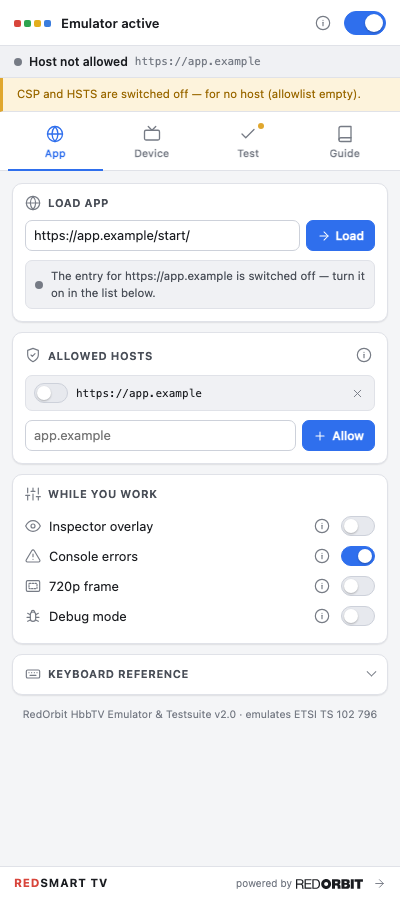
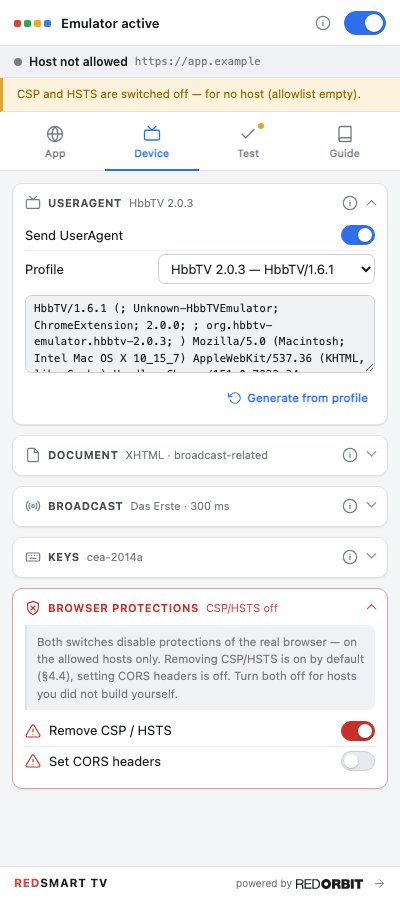
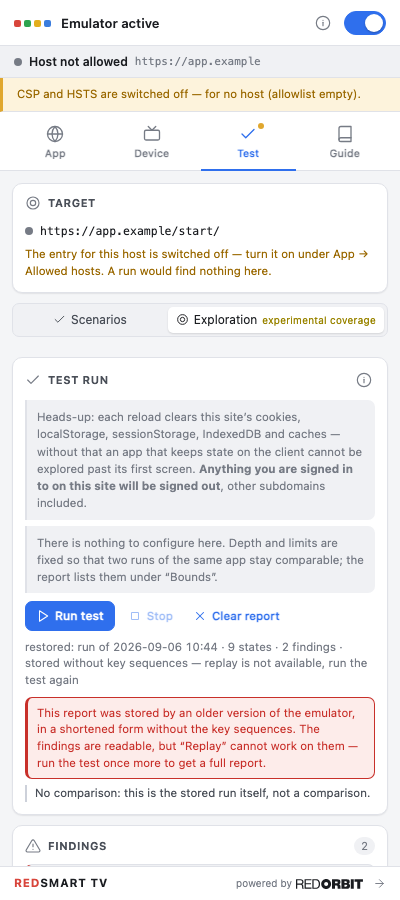
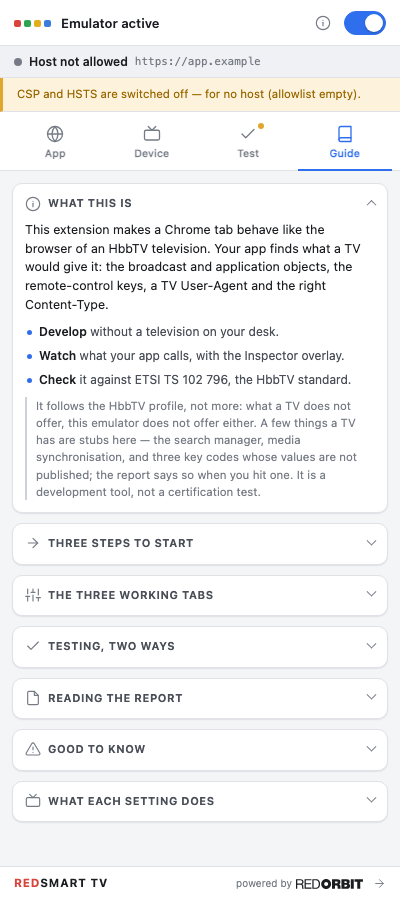
Real screenshots of the real panel. The yellow band at the top is not a mock-up: the emulator keeps the state of the browser's protections visible at all times, because you are meant to notice it.
Runtime
Where the emulator's code actually runs
The same thing in words
- The service worker holds the allowed-host list, rewrites the User-Agent on the request itself, registers the polyfill for those hosts, and hands it its configuration before the page runs.
- The side panel is the interface: the switches, the report, the guide.
- Inside the tab, the polyfill runs in the page's own world — the same world as your application. It has to, because objects defined in any other world are invisible to the page. This is what “Allow user scripts” turns on.
- A small bridge in the isolated world does the things the page's world cannot: reaching extension assets and talking to the service worker.
Profiles
Seven television profiles
| Marketing name | Spec version | Note |
|---|---|---|
| HbbTV 1.5 | TS 102 796 v1.2.1 | |
| HbbTV 2.0 | v1.3.1 | |
| HbbTV 2.0.1 | v1.4.1 | default |
| HbbTV 2.0.2 | v1.5.1 | |
| HbbTV 2.0.3 | v1.6.1 | |
| HbbTV 2.0.4 | v1.7.1 | |
| HbbTV 2.0.5 | v1.8.1 | candidate |
Keys
Your keyboard is the remote
- Rred
- Ggreen
- Yyellow
- Bblue
- ↑ ↓ ← →navigate
- EnterOK
- BackspaceBACK
- Spaceplay
- Ppause
- Sstop
- Fforward
- Wrewind
- 0 – 9numbers
And which of them your application is allowed to see
The same thing in words
- RED = 0x1 — VK_RED
- GREEN = 0x2 — VK_GREEN
- YELLOW = 0x4 — VK_YELLOW
- BLUE = 0x8 — VK_BLUE
- NAVIGATION = 0x10 — arrows · ENTER · BACK
- VCR = 0x20 — transport keys
- SCROLL = 0x40 — PAGE_UP · PAGE_DOWN
- INFO = 0x80 — VK_INFO
- NUMERIC = 0x100 — digits 0–9
- ALPHA = 0x200 — alphabetic
- OTHER = 0x400 — everything else
Two rules travel with the value. setValue(v) stores v & maximumValue, so you never get a group the terminal does not support. And the set you request is the minimum the terminal may send: an application must not assume it will receive only the groups it asked for.
Layers
What sits in front of what
The same thing in words
- Subtitles are in front of everything else.
- Your application is in the middle, drawn on a transparent body. An HbbTV application that paints an opaque background has hidden the broadcast picture, which is usually not what was intended.
- The broadcast picture is behind both. On a television it is a video plane that the browser is composited over, so it is not in the document at all. The emulator has no such plane and uses a page-wide layer at the very bottom of the stacking range instead.
History
Why this is called 2.0 when there was never a 1.0
There was a first one. It went into the Chrome Web Store in September 2021, never got past version 0.7, and did three things: it let you drive an application with the remote keys, it drew the 720p frame, and it played MP4. No test suite, no report, no citations, no user-agent profiles, no inspector, no keyset gating. Over the five years it was listed, it was installed 6,155 times, until Chrome stopped running Manifest V2 extensions and took it with them.
That number belongs to the old extension, not to this one. It is on this page because it is the reason the tool was rebuilt rather than retired, and because leaving it out would let it be read as traffic this version has earned.
The version jump is deliberate too. 2.0.0 follows 0.7 because the rebuild shares almost nothing with it — a 0.7 that became a 0.8 would have told you the wrong thing about how much changed. It has been in the store since 13 September 2026, and we publish no adoption figure for it.
Limits
What this is not
It is a development tool, not a conformance test bench. It does not prove that your app runs on a real device. The renderer is Blink, not a device browser; performance, memory limits, codec support and real tuner timing all differ.
Not emulated, on purpose: PVR and recording, DRM of any kind, real tuner access, the DSM-CC object carousel and dvb:// URLs, AIT signalling, operator apps, companion screen, DIAL and media synchronisation. Access to these returns defined stubs so apps do not crash, but there is no functional emulation behind them.
And it emulates HbbTV, only HbbTV. For Tizen, webOS, Titan OS and Whale OS we use the vendor tooling and real devices, because that is what those platforms give you.
Warning
A warning worth reading twice
For allowed hosts, the emulator can remove Content-Security-Policy and Strict-Transport-Security from responses — that is on by default, because HbbTV apps routinely need it — and can add a permissive CORS header, which is off by default. The side panel shows at all times which host currently has which protection disabled.
Put only hosts you develop yourself on the allowed list. A third-party host you allow loses, for the duration of the allowance, the protections its operator set.
Privacy
No account, no telemetry, no analytics, no tracking. Settings live in chrome.storage.local and are never synced to your Google account.
Two requests can ever leave your machine, both to api.anthropic.com and both only on your click: checking your API key when you save it, and the optional AI summary of a report. Without a key, the extension makes no network request of its own at all.
Requirements
What you need before it works
- Chrome 120 or newer
- Desktop Chrome. The extension is Manifest V3 and uses the side panel, which is where that floor comes from.
- “Allow user scripts”, turned on once
- In chrome://extensions → Details. Without it the page still gets the TV User-Agent header, but navigator.userAgent stays Chrome's — and the Device tab tells you so rather than letting you test against a half-emulated device.
- A host you have added yourself
- The extension acts on the hosts in your allowed list and nowhere else. Nothing happens outside that list. That is the design, not a limitation.
- Nothing else
- No account, no sign-in, no key. An Anthropic API key is optional and buys exactly one thing: the AI summary of a report.
Questions
Six things that come up
- Why does nothing change when I switch the User-Agent?
- Some switches take effect at once — the Inspector, the 720p frame, the key mapping. The ones that change what the page is served — User-Agent, document type, browser protections — need a reload, because an application reads those objects once at startup.
- Why is the CSP and HSTS switch on from the start?
- Because those headers are usually what stops the emulator from working on a site you built yourself. It is on from the start for hosts in your allowed list, and the yellow banner at the top of the page says so. The CORS switch is off. Turn both off for any host you did not build yourself.
- Does anything leave my machine?
- Two requests can, both to api.anthropic.com and both only on your click: checking your API key when you save it, and the report summary when you press “Summarise report”. “Preview what gets sent” shows you that request before it goes. Without a key the extension makes no network request of its own at all.
- How do I show and hide the Inspector?
- Ctrl + Shift + H toggles it inside the page.
- What does “Allow user scripts” actually change?
- Without it the page still receives the television User-Agent as an HTTP header, but navigator.userAgent inside the page stays Chrome's. An application that checks the string in JavaScript then sees a desktop browser. The Device tab warns you when that is the case.
- Where do I find out what a setting does?
- Every (i) in the panel explains the setting next to it, and names the passage in the standard where there is one.
Next
Developers
The emulator also writes the report
Two ways to run your app against it, one report format, 92 rules — and a citation on every rule that claims your app departs from the standard.
How the testing works →Broadcasters
We also build the applications, not only the tool
HbbTV app development since 2008 — Mediathek, EPG, operator applications and SwitchIn. Or we run this suite against your app as an audit and hand you the report, with the findings separated from the limits of the tool.
HbbTV app development →